
Easy Steps to Speed Up Your Android Phone in 2026

In 2026, everything is smart and intelligent. So why not Android phones? However, many of us still don’t know how to take full advantage of the latest smartphones.
See, the latest smartphones are really smart. So you don’t have to make huge technical changes to use them smartly. All you have to do is speed them up and optimize them. That’s it!
Here we’ll discuss and learn about both to make the best use of your Android phone.
We’ll discuss two methods. The first method explains how to speed up your Android phone. The second method is to increase the phone’s speed by removing unnecessary or unused apps.
Let’s not delay and get to work right away.
Method 1: Increase the Speed of Your Android Phone in 5 Easy Steps
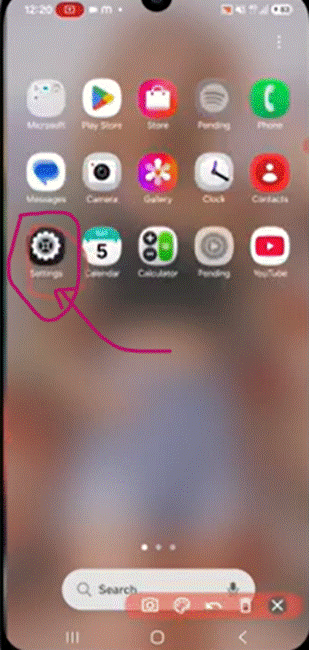
Step 1:
Go to the settings of your phone (see the image below)
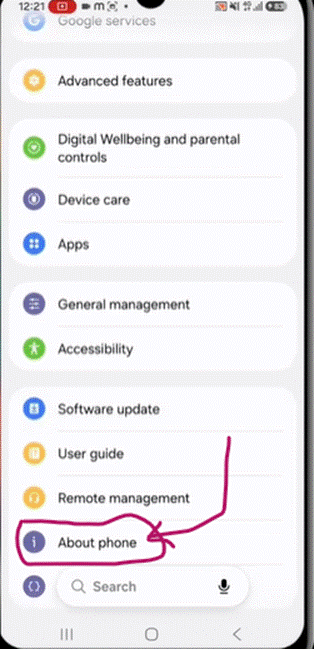
Step 2:
Go to the option “About phone”
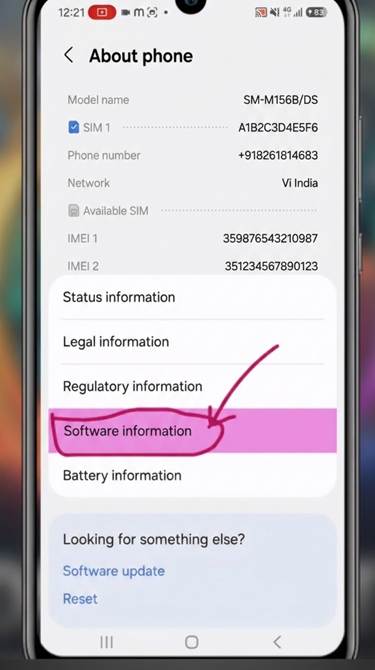
Step 3:
Find the option called ‘Software information’ and tap on it
Step 4:
Tap on the option “Build number” multiple times (5 to 6 times) continuously. This process will open or enable the “Developer options” for you.
To access Developer mode, go back to the phone’s settings.
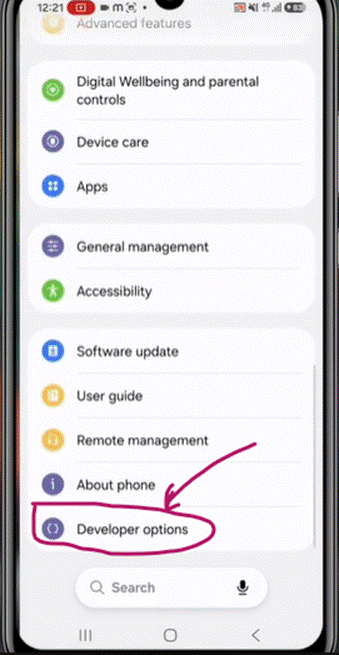
Step 5:
Click on “Developer options” and change the Animation scale from 1x to .5x.
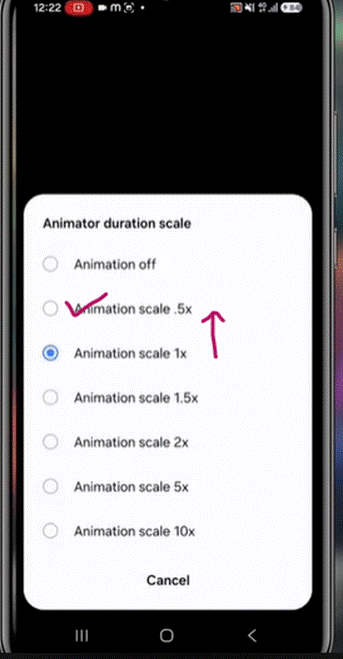
That’s all; your job is done!
Now, your Android phone will run at lightning speed. After this, we’ll go through the 2nd method. Let’s discuss how to speed up Android phone by optimizing and removing unnecessary/unused apps from your smartphone.
Method 2: Make Your Android Phone Faster by Removing Unnecessary/unused Apps
Now, check out the second method, which teaches you how to make Android faster by removing unnecessary and unused apps.
Step 1:
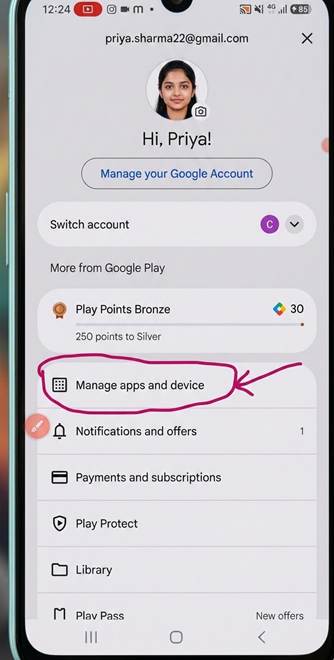
Go to the Google Play Store and click on your profile in the top-right corner, as shown in the image below.

Step 2:
Click on Manage apps and device
Step 3:
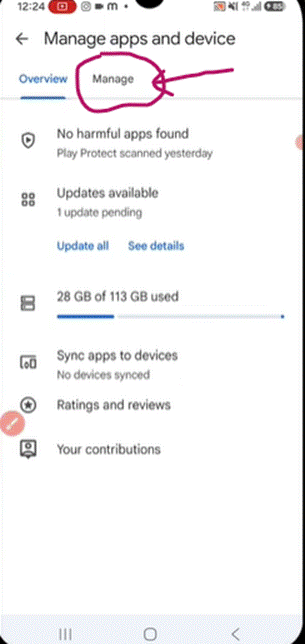
In the next screen, you’ll see two options: 1) Overview and 2) Manage. Select “Manage”
Step 4:
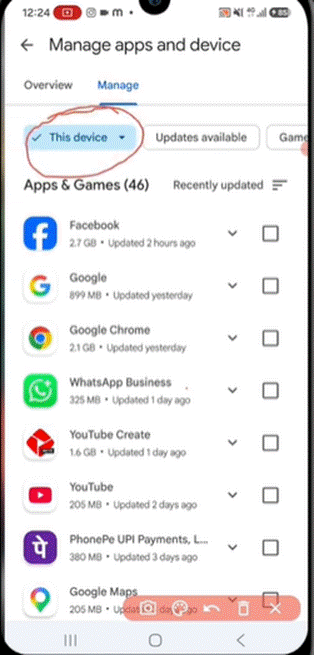
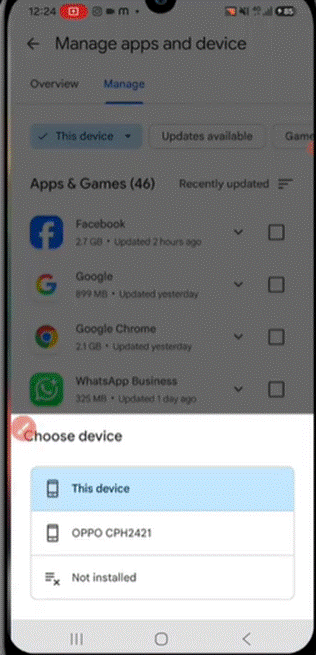
The “This device” tab will be selected by default. Under this tab, you’ll see all the apps that are installed on your mobile phone.
Step 5:
Now, you need to tap on the “This device” option, as a pop-up window will open at the bottom. In that pop-up box, select the “Not installed” option to open the list of apps that are currently uninstalled on your device.
Step 6:
When you click the “Not installed” option, a list of apps currently uninstalled on your mobile phone will open. You’ll see a delete option in the top-right corner of your device. You’ll also see a checkbox next to each app. Whichever apps you want to delete, tick the checkbox next to those apps.
- If you want to delete all the apps, then choose the option “Select all” from the top of the list.
Now, click on the delete option.
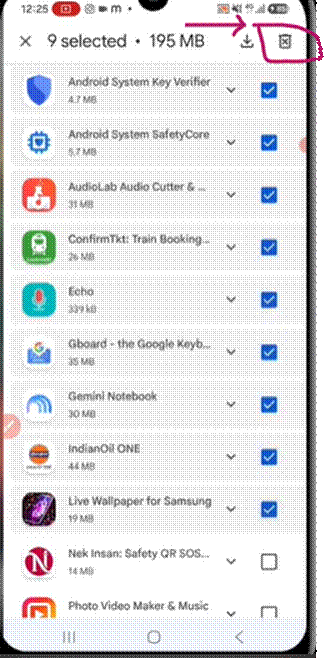
That’s all. You have completed all the necessary steps to make your Android phone run faster than ever. Hope now you know all the tricks on how to speed up Android phone. So next time, please don’t get stuck if anyone asks you to make their mobile faster.
What’s Next? Try and Explore the Method
Now, you understand the full process for making your Android phone faster. What’s next? Why not apply the methods as explained on your phone itself? Don’t worry, the methods are very easy and harmless. For a sample test, try the steps with your phone first. If the result is satisfactory, become the phone mechanic for your friends and neighbors as well!
Let us know the results you got when someone asked you how to make Android faster. Wishing you luck with your Android phone repair.
To read more interesting articles visit – https://ventureblogging.com